Obsidian, anywhere
The vault is only useful if you can reach it — immediately, from wherever you are, on whatever you have in your pocket. That single constraint shapes every PKM workflow decision I've made in the last two years. I recently came across an approach that routes Claude's phone app through a Raspberry Pi at home: a lightweight MCP server runs on the Pi, syncs with Obsidian's own sync service, and anything you ask Claude to read or write lands in the vault within seconds. My own setup does the same thing differently.
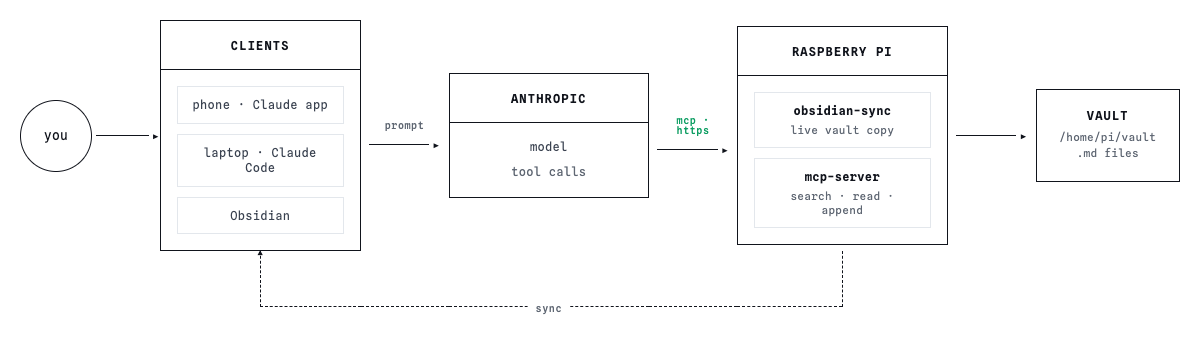
- The Pi approach is elegant for people who already have the hardware: a roughly 100-line Python server exposes four tools — list, read, write, search — GitHub OAuth locks it to one account, and Tailscale Funnel gives it a public URL that Claude's servers can reach. The vault lives on the Pi's SD card and stays in sync like any other Obsidian device.
- I run an OpenClaw agent on a rented server instead. The agent connects outbound through Slack, so there's no exposed port — I message it the way I'd message anyone. Tailscale handles the private tunnel between the server and my home network, so the vault stays off the public internet entirely.
- On cost, the two approaches land in the same neighbourhood: both run on a Claude subscription. If the vault were the only use case, something like Gemma 4 would cover it for considerably less.
- The bigger difference is what the agent can do once it has vault access. Mine manages templates, links notes together, and when I capture a quote it adds the exact source and page number automatically. A four-tool MCP server doesn't do any of that by default.
The question worth asking before you set anything up is what you actually need the AI to do once it has access. Capture and retrieval are the easy part — most of the value in a PKM workflow comes from the operations that happen around the notes, not just inside them.
Committed to main,
Zhenia